Slip Surface Search Overview
Search for the critical slip surface across circular and non-circular families.
The slip-surface search finds the surface with the lowest factor of safety. JSlope offers several search methods, from a fast automatic circular search to population-based metaheuristics for non-circular surfaces, plus an option to evaluate a single surface you define yourself.
Choosing a search method
The search method is selected from a single menu in the slip-surface settings:
| Method | Surface family | Page |
|---|---|---|
| Adaptive Circular Search | Circular | Circular Search |
| User-defined | Single surface you draw | User-Defined |
| Block Search Polyline (Non-Circular) | Non-circular block | Block Search |
| Particle Swarm Optimization (Non-Circular) | Non-circular | Metaheuristic Search |
| Cuckoo Search (Non-Circular) | Non-circular | Metaheuristic Search |
| Differential Evolution (Non-Circular) | Non-circular | Metaheuristic Search |
The three metaheuristic methods (PSO, Cuckoo, DE) optimize non-circular polyline surfaces using the block-search window as their starting geometry.
A search complexity slider (Very low to Very high) lets you scale a method's search effort up or down by adjusting its underlying parameters together; the documented per-method defaults below correspond to the medium setting and to the raw default settings.
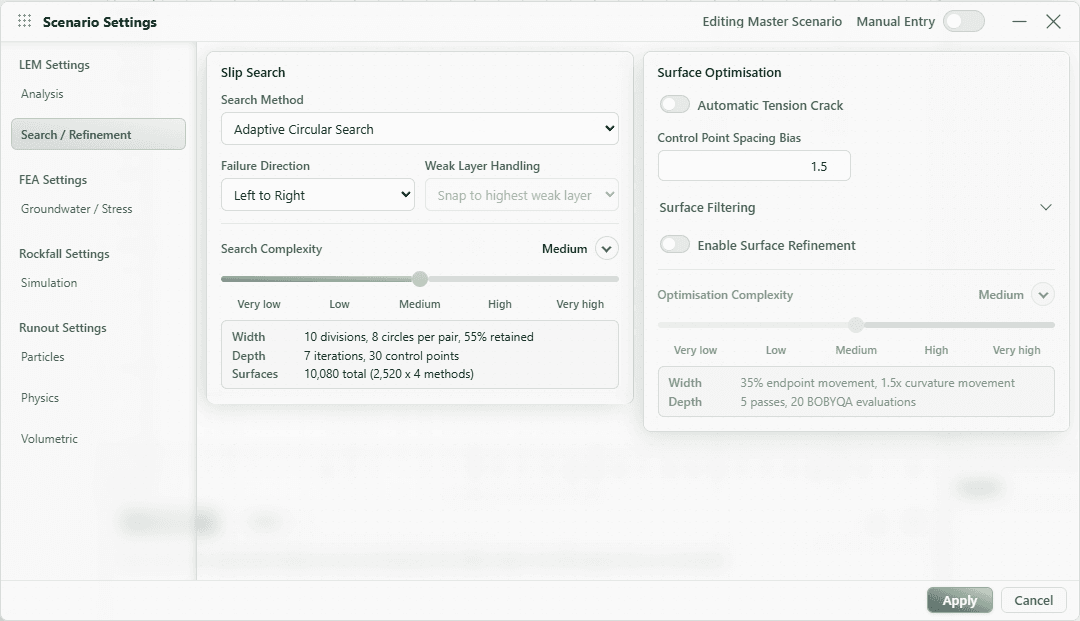
Surface Refinement
Any search can be followed by an optional surface-refinement post-processing step that perturbs the critical surface's geometry to find a lower factor of safety. It is off by default. See Surface Refinement.
Failure direction
Set the failure direction to tell the solver which way the mass slides:
- Left to Right (default)
- Right to Left
The failure direction also fixes the sign convention for seismic loading.
Slope limits
By default, the left and right ends of candidate surfaces are bounded by limits computed automatically from the slope geometry. You can optionally enable custom slope limits to restrict the search to specific left/right ranges. A second limit set can be enabled so that the left endpoint and the right endpoint are constrained to different ranges. You can also drag the limit markers on the canvas; releasing the mouse applies the new limits as one undo step, and pressing Escape during the drag puts them back where they were.
Weak layers
When weak layers are present, candidate surfaces can be snapped or clipped to follow them. The behavior is controlled by the weak-layer handling mode. See Weak Layer Handling.
Automatic slice boundaries
Regardless of method, the solver inserts slice boundaries at the locations where the surface crosses important features, so that each slice has uniform properties along its base. By default this includes intersections with:
- the water table,
- piezometric lines,
- the phreatic surface, and
- material boundaries.
These are controlled by advanced settings (all on by default). Tension-crack locations are also forced as slice boundaries when a tension crack truncates the surface.