Materials Overview
Assign strength models and parameters to each material region.
A model carries a catalog of materials. Each material region in the geometry is assigned one material, and every material defines a unit weight, a fill style, a shear-strength model, optional water properties, and optional elastic properties.
The material catalog
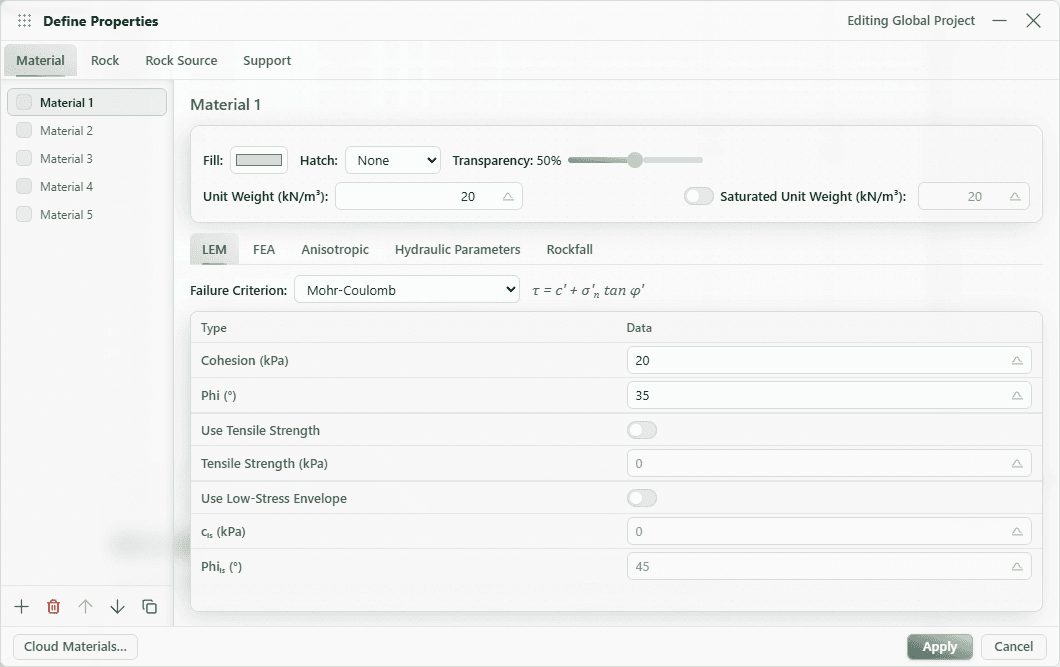
New models start with five default materials (Material 1 through Material 5), each with a unit weight of 20 kN/m³ and a distinct fill color. You can add an unlimited number of custom materials, rename them, recolor them, and delete the ones you do not use.
When you are signed in, new models start with your Cloud Materials packages instead, unless you turn that off in your account preferences.
Open Configure → Define Properties → Material for the full editor. Select a material on the left, then choose its LEM, FEA, Anisotropic, Hydraulic Parameters, or Rockfall tab. Toolbar buttons add, delete, duplicate, and reorder materials. Choose Apply to save edits.
To assign a material, right-click a region on the canvas and choose Assign Material.
Per-material properties
These properties apply to every material regardless of strength model.
| Parameter | Unit | Default | Description |
|---|---|---|---|
| Name | — | Material N | Display name; must be unique. |
| Fill color | — | catalog color | Region fill color. |
| Hatch pattern | — | None | Overlay pattern: None, Diagonal, Cross, Dots, Horizontal, or Vertical. |
| Unit Weight | kN/m³ | 20 | Total (moist/dry) unit weight used for slice self-weight. |
| Saturated Unit Weight | kN/m³ | (= unit weight) | Optional. Enable the checkbox to apply a separate unit weight below the water surface. |
When Saturated Unit Weight is disabled, the material uses its unit weight everywhere. When enabled, the saturated value is applied to the portion of each slice below the assigned water surface.
Probabilistic material values
Supported numeric fields show a distribution button beside the deterministic value. Enable a constant, normal, or gamma distribution, optionally apply absolute bounds, then set the scenario sample count and random seed in LEM Analysis settings. A normal distribution uses the ordinary material value as its mean.
Probabilistic sampling runs automatically during LEM compute whenever at least one supported field is enabled. See Probabilistic Materials for the complete workflow and graph controls.
Shear-strength models
The strength model is selected per material on the LEM tab under Failure Criterion. Four models are available:
- Mohr-Coulomb — effective cohesion and friction angle. The default model.
- Generalized Hoek-Brown — rock-mass strength from intact-rock and rock-mass parameters.
- Generalized Shear Function — a user-defined shear-versus-normal-stress curve.
- Generalized Anisotropic — direction-dependent strength built from other materials.
Water and elastic properties
- Material Water Properties (Hu) — per-material water surface assignment and the Hu pore-pressure coefficient, edited on the Hydraulic Parameters tab.
- Elastic Properties (FEA) — Young's modulus and Poisson's ratio, edited on the FEA tab. Used only by the finite-element analysis.
Tip
The Hydraulic Parameters tab shows different fields depending on the model's Pore Pressure Source. With a defined phreatic surface it shows the water surface and Hu controls; with FEA Groundwater it shows hydraulic conductivity and porosity. See Groundwater Overview.