Simulation Models & Settings
Choose Lumped Mass or Rigid Body and configure numerical, stopping, sampling, and contact controls.
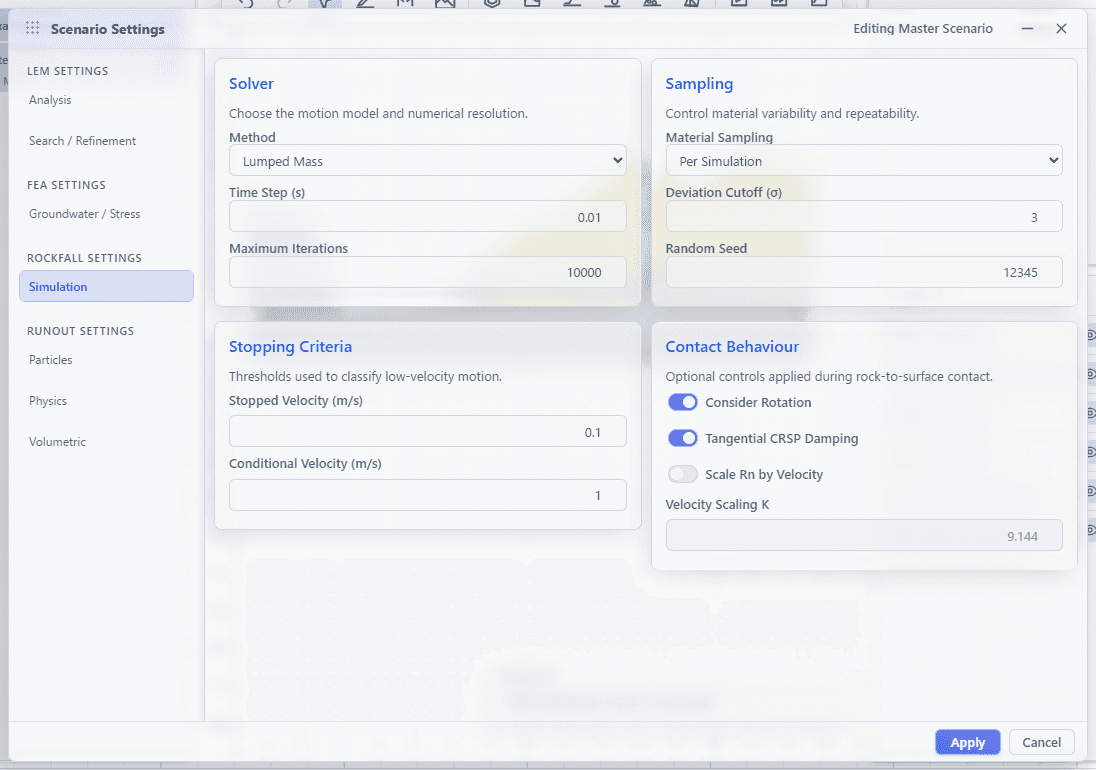
Open Configure → Scenario Settings → Rockfall → Simulation. Rockfall settings belong to the scenario and can be applied to several selected scenarios at once.
Lumped Mass
Lumped Mass treats each Rock as an equivalent moving body governed by the Lumped Mass restitution, friction, and optional impact-angle roughness inputs. It uses Rock mass, density, launch velocity, angular state, and the scenario's contact-behavior switches.
The selected Rock outline is not transferred to this engine. Choose Lumped Mass when a shape-resolved contact model is not required.
Rigid Body
Rigid Body transfers the selected 2D Rock outline, mass, density, orientation, angular state, and the Rigid Body restitution, dynamic-friction, and rolling-friction inputs. It supports the predefined Rock shapes and custom polygons.
Choose Rigid Body when rotation and shape-resolved contacts are material to the model. It generally carries more geometric state per Rock than Lumped Mass.
Solver settings
| Setting | Meaning | Default |
|---|---|---|
| Method | Lumped Mass or Rigid Body | Lumped Mass |
| Time Step | Numerical integration interval | 0.01 s |
| Maximum Iterations | Maximum integration steps for each Rock | 10,000 |
| Stopped Velocity | Low-speed threshold used to classify a Rock as stopped | 0.1 m/s |
| Conditional Velocity | Secondary low-speed threshold used by contact/stopping logic | 1 m/s |
| Material Sampling | Redraw frequency for variable contact response | Per Simulation |
| Deviation Cutoff | Standard-deviation bound applied to samples | 3σ |
| Random Seed | Repeatable base seed for every Rock job | 12345 |
Time Step must be greater than zero, Maximum Iterations must be a positive integer, and thresholds/cutoff must not be negative.
Contact behavior
- Consider Rotation includes the configured rotational response where the selected engine supports it.
- Tangential CRSP Damping enables tangential contact damping.
- Scale Rn by Velocity enables velocity-dependent normal restitution.
- Velocity Scaling K controls that Rn scaling response.
Velocity Scaling K has a minimum of 0.001. The settings forms, project-file
reader, and solver reject lower values, including when Rn velocity scaling is
disabled. Leave the positive default unless deliberately calibrating this
option.
Material sampling frequency
| Option | Sampling behavior |
|---|---|
| Per Simulation | Draw one response per material for each Rock simulation. |
| Per Segment | Draw a response for each terrain segment for each Rock. |
| Per Impact | Draw again when a Rock enters a new terrain contact. Continuous rolling or sliding contact keeps its current response until a new contact. |
The setting affects variable restitution and friction fields for both engines. Rock mass, density, and launch-condition distributions are sampled once per Rock job.
How computation is scheduled
Rockfall Compute builds one job per allocated Rock. When browser workers are available and the batch is large enough, jobs are split across a persistent worker pool; if workers are unavailable or parallel execution fails, computation falls back to the main thread. Both engines run as WebAssembly.
Completed trajectories are reduced for display to 0.1 s samples while retaining the first and final point. Collision samples are retained at a minimum 0.01 s separation, and playback interpolates position and rotation between retained samples.
WebGPU is not required to run the solver. It is required for animated all-rock and individual-rock display; see Results, Playback & CSV.