Terrain & Contact Materials
How JRunout derives collision terrain and assigns Lumped Mass or Rigid Body contact properties.
Rockfall terrain comes from the same closed External Boundary used by the shared project model. The Rockfall solver does not collide with the complete closed polygon: it derives one exposed surface and orders that surface from left to right.
How the exposed surface is chosen
- The solver finds the boundary's leftmost and rightmost points.
- It builds the two boundary paths between those points.
- It chooses the path with the higher length-weighted average elevation.
- It orders the chosen path left to right.
- Projected Berm surfaces replace the original terrain beneath each Berm footprint.
This works well for ordinary 2D slope cross-sections. Check the resulting model carefully when the boundary contains overhangs, repeated horizontal positions, or an unusual lower closure: the solver still reduces it to one selected exposed path.
Assign a material to every terrain segment
Each exposed terrain segment must resolve to one project material. The solver uses this order:
- An explicit Rockfall Material Override on the External Boundary segment.
- Otherwise, the material region immediately adjacent to that segment.
To set an override, select an External Boundary segment and choose a material in the inspector's Rockfall Material Override field. None returns the segment to adjacent-region inference.
A Berm has its own material selection in the inspector. A missing Berm material is a compute error even when the underlying terrain has a material.
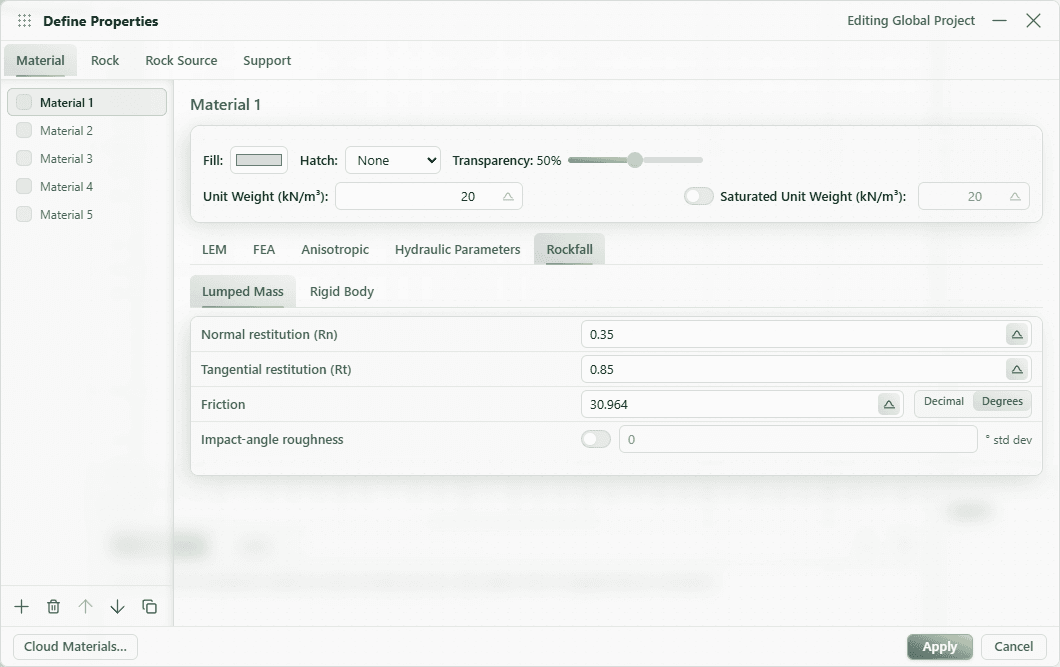
Lumped Mass parameters
| Parameter | Role |
|---|---|
| Normal restitution (Rn) | Normal rebound response at contact. |
| Tangential restitution (Rt) | Tangential velocity response at contact. |
| Rockfall friction | Basal sliding friction; separate from the material's slope-strength friction angle. |
| Impact-angle roughness | Optional normally distributed perturbation of the local Lumped Mass contact angle. |
The roughness standard deviation is entered in degrees and is limited to the exposed contact hemisphere.
Rigid Body parameters
| Parameter | Role |
|---|---|
| Normal restitution (Rn) | Rigid-body normal rebound response. It is stored separately from Lumped Mass Rn. |
| Tangential restitution (Rt) | Tangential contact response. |
| Dynamic friction | Sliding resistance during rigid contact. |
| Rolling friction | Rotational/rolling resistance during rigid contact. |
Friction controls can be displayed as decimal coefficients or angles where the editor offers that unit toggle. The underlying Rockfall friction field remains distinct from the material's slope-stability strength parameters.
Probabilistic material response
Every restitution and friction field listed above can be deterministic or use a Normal or Gamma distribution with optional absolute minimum and maximum bounds. The scenario's Deviation Cutoff (σ) limits sampled values, and the solver also enforces physical ranges:
- restitution and decimal friction coefficients: 0 to 1;
- Lumped Mass Rockfall friction angle: 0° to 90°;
- roughness angle standard deviation: 0° to 89°.
Choose how often material response is redrawn in Simulation Models & Settings.
Terrain validation failures
Rockfall cannot start for a scenario when:
- the External Boundary does not yield a valid exposed surface;
- a terrain segment has no adjacent or override material;
- an override references a missing material;
- a terrain segment has zero length or invalid coordinates;
- a Berm has no material, has a foot away from the terrain surface, or overlaps another Berm footprint.
During a multi-scenario run, scenarios with incomplete Rockfall inputs are skipped before the valid scenarios start. The solver window retains each skipped scenario's name and validation reason, and labels the batch incomplete until you start another run.